
- Home
- Arduino Uno R3 DIP Board With USB Cable (ATmega328P)
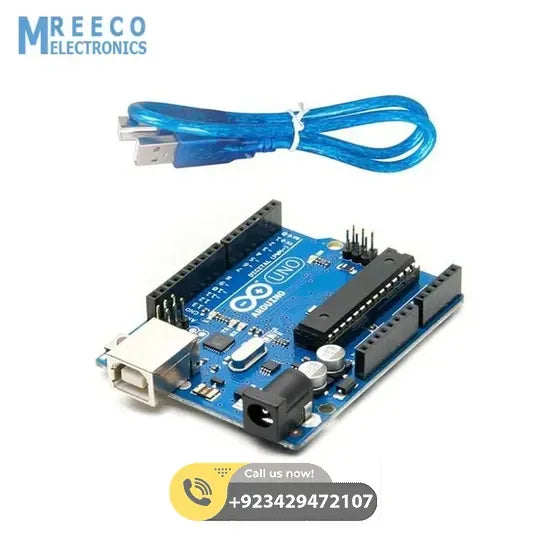
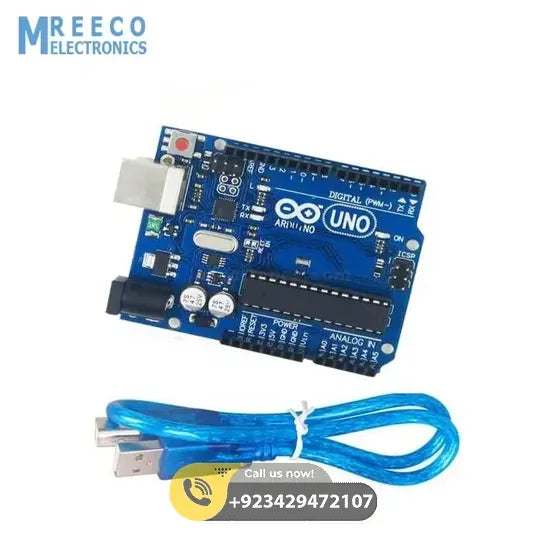
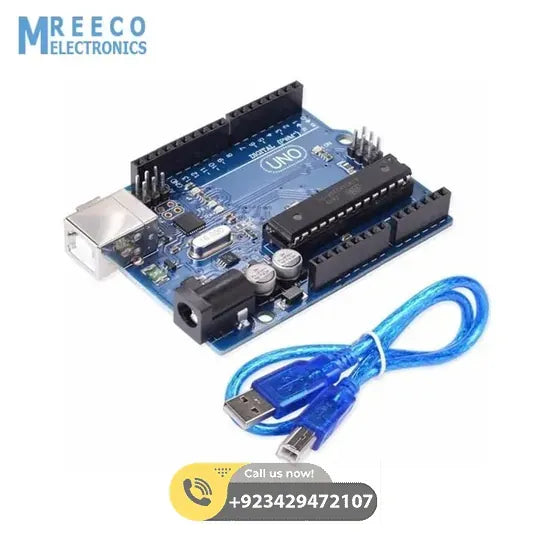
Arduino Uno R3 DIP Board With USB Cable (ATmega328P)
In stock
Arduino Uno R3 price in Pakistan: Rs. 1,200 with USB cable (November 2026). This is the classic Arduino Uno R3 with the removable DIP ATmega328P chip and the ATmega16U2 USB chip, the same design as the original Uno. I...
Ask about this product on WhatsApp- Fast deliveryFree shipping on prepaid orders above Rs. 10,000
- Secure payment100% secure payments by Meezan Bank
- SupportMonday to Saturday, 11:00 AM to 8:00 PM
- ReturnsSee our return and refund policy
Description
Arduino Uno R3 price in Pakistan: Rs. 1,200 with USB cable (November 2026). This is the classic Arduino Uno R3 with the removable DIP ATmega328P chip and the ATmega16U2 USB chip, the same design as the original Uno. It works on Windows, Mac and Linux without installing an extra driver, and the USB cable is in the box, so you can plug it in and upload your first program in minutes. Buy it from MREECO Electronics, Shop #30, Mashallah Center, Hall Road, Lahore, or order online with delivery to every city in Pakistan and cash on delivery.
Key features
- ATmega328P in a DIP socket: if the chip is ever damaged, you can replace the chip instead of the whole board.
- ATmega16U2 USB-to-serial chip: no CH340 driver needed; the board shows up as "Arduino Uno" in the Arduino IDE.
- USB cable included: USB-A to USB-B, for programming and 5V power.
- 14 digital I/O pins (6 PWM), 6 analog inputs, 16 MHz, 32 KB flash.
- Works with all Uno shields and with every Arduino Uno tutorial, book and course.
- Powered by USB, a 7–12V adapter or a 9V battery.
Arduino Uno R3 specifications
| Microcontroller | ATmega328P (28-pin DIP, removable) |
|---|---|
| USB interface chip | ATmega16U2 |
| Operating voltage | 5V |
| Input voltage (recommended) | 7–12V |
| Input voltage (limits) | 6–20V |
| Digital I/O pins | 14 (PWM on 3, 5, 6, 9, 10, 11) |
| Analog input pins | 6 (A0–A5), 10-bit |
| DC current per I/O pin | 20 mA recommended, 40 mA absolute maximum |
| 3.3V pin current | 50 mA |
| Flash memory | 32 KB (0.5 KB used by the bootloader) |
| SRAM | 2 KB |
| EEPROM | 1 KB |
| Clock speed | 16 MHz |
| Connectors | USB-B, 2.1 mm DC jack, ICSP header, reset button |
| On-board LED | Pin 13 |
| Size | 68.6 x 53.4 mm |
Arduino Uno price in Pakistan: which Uno should you buy?
MREECO stocks two Uno R3 versions. Both run the same code; the difference is the chip package, the USB chip and whether a cable is included.
| Uno R3 DIP with cable (this board) | Uno R3 SMD (CH340) | |
|---|---|---|
| Price | Rs. 1,200 | Rs. 650 |
| Microcontroller | ATmega328P DIP (replaceable) | ATmega328P SMD (soldered) |
| USB chip | ATmega16U2, no driver | CH340, may need driver |
| USB cable | Included | Not included (buy USB cable for Rs. 130) |
| Best for | Beginners, labs, chip programming | Lowest cost, classes, bulk orders |
Choose this DIP board if you are new to Arduino, want the setup to "just work", or want to program bare ATmega328P chips for your own PCBs. Choose the SMD board if price matters most or you are buying many boards for a class.
Arduino Uno R3 pinout explained
Every pin on the Uno has a label printed next to it. Here is what each group does:
- Digital pins 0–13: read buttons and switches, or turn LEDs, buzzers and relays on and off. Pins 0 (RX) and 1 (TX) are also the serial port, so avoid them while using the Serial Monitor.
- PWM pins 3, 5, 6, 9, 10, 11 (marked with ~): give an adjustable output for LED dimming, motor speed control and servo motors.
- Analog pins A0–A5: read sensors that give a voltage, such as potentiometers, LDRs, LM35 temperature sensors and soil moisture sensors. They can also be used as extra digital pins.
- I2C (A4 = SDA, A5 = SCL): connect I2C LCDs, OLED displays, RTC modules and the MPU6050 with only two wires. The R3 also has separate SDA/SCL pins near the AREF pin.
- SPI (10 = SS, 11 = MOSI, 12 = MISO, 13 = SCK): for RFID readers, SD card modules and TFT displays.
- External interrupts: pins 2 and 3: for encoders, flow sensors and fast pulse counting.
- Power header: IOREF, RESET, 3.3V, 5V, GND and VIN. Use 5V and 3.3V to power small sensors; use VIN to feed 7–12V into the board.
- ICSP header: for burning a bootloader or programming the chip with a USBasp programmer.
How to power the Arduino Uno
- USB cable: 5V from a laptop, PC or a phone charger. Best for programming and small projects.
- DC jack: a 7–12V adapter with a 2.1 mm centre-positive plug, or a 9V battery with a DC plug. Above 12V the on-board regulator gets hot.
- VIN pin: an external 7–12V supply, such as two 18650 cells in series (7.4V).
- 5V pin: a regulated 5V supply only. Feeding anything higher into the 5V pin can damage the board.
Motors, servos, pumps and LED strips need more current than the Uno can give. Power them from a separate supply or a bench power supply, and connect the grounds together.
Your first program in 5 minutes
- Download and install the free Arduino IDE from arduino.cc.
- Connect the Uno with the included USB cable. The green ON LED lights up.
- Open Tools > Board and select Arduino Uno.
- Open Tools > Port and select the port that says "Arduino Uno".
- Open File > Examples > 01.Basics > Blink and click Upload.
- The LED next to pin 13 starts blinking once per second. Change the
delay(1000)value, upload again, and watch the speed change.
Because this board uses the ATmega16U2 USB chip, Windows 10/11, macOS and Linux recognise it directly. No separate driver download is needed.
What can you build with the Arduino Uno R3?
- LED projects: blinking LEDs, traffic lights, running lights and RGB colour mixing with LEDs.
- Sensor projects: digital thermometer, distance meter, motion alarm and gas leak detector with Arduino sensors.
- Display projects: show readings on a 16x2 LCD display, an OLED or a 2.4 inch TFT touch shield.
- Robots: line follower, obstacle-avoiding car and Bluetooth car with motor drivers and servo motors.
- Home automation: switch lights and fans with a 4 channel relay module.
- Machines: a mini CNC or pen plotter with the CNC Shield V3 and stepper motors.
- School and university projects: science fair projects, embedded systems labs and final year projects (FYP).
Recommended accessories
- Sensor Shield V5: plug sensors and servos in with 3-pin cables, no breadboard needed.
- Proto Shield with mini breadboard: build small circuits right on top of the Uno.
- 37-in-1 Sensor Kit: 37 modules to learn with this board.
- Jumper wires and breadboards from wires & cables.
- An acrylic case to protect the board.
- Want everything in one box? See Arduino kits such as the Arduino Starter Kit.
Uno vs Nano vs Mega
| Uno R3 | Nano V3 | Mega 2560 R3 | |
|---|---|---|---|
| Chip | ATmega328P | ATmega328P | ATmega2560 |
| Digital / analog pins | 14 / 6 | 14 / 8 | 54 / 16 |
| Flash | 32 KB | 32 KB | 256 KB |
| Shields | Yes | No | Yes (most) |
| MREECO price | Rs. 1,200 | Rs. 660 | Rs. 3,000 |
The Uno is the right first board. Move to the Nano when you need a small permanent build, and to the Mega when you run out of pins or memory. See all boards on the Arduino price in Pakistan page, or compare with ESP32 WiFi boards and other development boards.
Example: read a sensor and show it on the Serial Monitor
Connect a potentiometer or LDR to A0 (middle pin to A0, outer pins to 5V and GND), then upload this sketch and open Tools > Serial Monitor at 9600 baud:
void setup() {
  Serial.begin(9600);
  pinMode(13, OUTPUT);
}

void loop() {
  int value = analogRead(A0);        // 0 to 1023
  Serial.println(value);
  digitalWrite(13, value > 512);    // LED on above half
  delay(200);
}
Turn the knob or cover the LDR: the numbers change and the pin 13 LED switches on above the middle value. The same pattern (read an input, decide, drive an output) is the base of almost every Arduino project.
Buying checklist: how to choose a good Arduino Uno
- Check the USB chip: ATmega16U2 means no driver; CH340 means a quick driver install on some PCs. This board has the ATmega16U2.
- Check the chip package: a DIP chip in a socket can be replaced; an SMD chip cannot. This board is DIP.
- Check what is in the box: many low prices online are for the board alone. This board includes the USB cable.
- Check the seller: buy from a shop that can test the board and replace it if it arrives faulty. You can visit MREECO on Hall Road or call before ordering.
- Check the total cost: board plus cable plus delivery. Compare that, not just the board price.
Safety tips to make your Uno last
- Never connect more than 5V to an I/O pin or short the 5V pin to GND.
- Do not draw more than about 20 mA from one pin; use a transistor or relay module for bigger loads.
- Use a flyback diode across relay coils and motors if you are not using a ready-made module.
- Keep the board off metal tables, or put it in an acrylic case.
- Keep a spare ATmega328P chip with a bootloader for quick repairs.
Troubleshooting
- No port in the Arduino IDE: try another USB port, and make sure the cable is the one in the box (some phone cables only charge).
- "avrdude: stk500_getsync" error: select Arduino Uno as the board, select the right port, and unplug anything connected to pins 0 and 1 while uploading.
- Board resets when a motor starts: the motor is drawing too much current. Power it separately.
- Board gets hot on a 12V adapter: use a 9V adapter instead, or reduce the load on the 5V pin.
Package includes
- 1 x Arduino Uno R3 board (DIP ATmega328P, ATmega16U2)
- 1 x USB cable (A to B)
Why buy the Arduino Uno from MREECO?
- Shop on Hall Road, Lahore: Shop #30, Ground Floor, Mashallah Center. Check the board before you buy.
- Delivery to Karachi, Islamabad, Rawalpindi, Faisalabad, Multan, Peshawar and all other cities, with cash on delivery.
- Bulk rates for schools, universities, labs and resellers. Call or WhatsApp 0342-9472107.
- Sensors, shields, displays and motors for your project in the same store: see Arduino components.
Frequently asked questions
What is the Arduino Uno price in Pakistan?
At MREECO, the Arduino Uno R3 DIP board with USB cable is Rs. 1,200 and the Arduino Uno R3 SMD board without cable is Rs. 650 (November 2026). Check this page for today's price.
Is a USB cable included?
Yes. This Arduino Uno R3 comes with a USB-A to USB-B cable for programming and power.
Do I need to install a driver for this Arduino Uno?
No. This board uses the ATmega16U2 USB chip, which Windows 10/11, macOS and Linux recognise without a separate driver.
What is the difference between Arduino Uno DIP and SMD?
The DIP Uno has a removable ATmega328P chip in a socket, so the chip can be replaced or taken out for your own circuit. The SMD Uno has the chip soldered to the board and is cheaper. Both run the same code.
Is the Arduino Uno good for beginners?
Yes. The Uno R3 is the board used in most Arduino tutorials, books, YouTube videos and starter kits, and it works with 5V sensors directly.
Can I power the Arduino Uno with a 9V battery?
Yes. Connect a 9V battery through the DC jack or the VIN pin. For longer battery life, use a 7–12V pack of rechargeable cells.
Do Arduino Uno shields fit this board?
Yes. All standard Uno shields, such as sensor, motor, relay, TFT, CNC and proto shields, plug straight into the headers.
Which programming language does the Arduino Uno use?
The Arduino Uno is programmed in C/C++ with the free Arduino IDE. Kids and beginners can also use block-based tools such as mBlock.
Can I use the Arduino Uno for my final year project?
Yes, for most control and sensor FYPs. If your project needs many sensors, GSM and GPS together, the Arduino Mega 2560 has more pins and serial ports; if it needs WiFi, use an ESP32.
Do you deliver the Arduino Uno outside Lahore?
Yes. MREECO delivers to every city in Pakistan by courier, with cash on delivery. You can also collect from our shop on Hall Road, Lahore. Call 0342-9472107 to confirm stock.
Specifications
| Brand | Arduino |
|---|---|
| Category | Development Boards |
| SKU | 637718942051546898 |
| Availability | In stock |
Shipping & Returns
Delivery across Pakistan. Free shipping on prepaid orders above Rs. 10,000.
Please read our return and refund policy before ordering.
You may also like
Handpicked products customers often buy together
Recently viewed
Pick up where you left off
